Chapters
  1. Welcome to Omarchy!
  2. Getting Started
  3. Coming From Mac or Windows
  4. Navigation
  5. The Top Bar
  6. Themes
  7. Hotkeys
  8. Unified Clipboard & History
  9. Reminders
  10. Notices
  11. Text Extraction & Dictation
  12. Screenshots & Recording
  13. Toggles, Idle & the Screensaver
  14. Omarchy CLI
  15. Terminal
  16. Neovim
  17. AI
  18. Development Tools
  19. Shell Tools
  20. Shell Functions
  21. TUIs
  22. GUIs
  23. Browsers
  24. Commercial apps/services
  25. Web Apps
  26. Gaming
  27. Filling out PDFs
  28. Windows VM
  29. Other Packages
  30. Updates
  31. Dotfiles
  32. Shell Plugins
  33. Monitors
  34. Keyboard, Mouse, Trackpad
  35. Networking
  36. System sleep
  37. Hardware authentication
  38. Fonts
  39. Backgrounds
  40. Prompt
  41. Branding
  42. Common tweaks
  43. Making your own theme
  44. Mac support
  45. Troubleshooting
  46. FAQ
  47. System snapshots
  48. Security
  49. Omarchy on...
  50. Dual Boot Install
  51. Unattended Installs

Notices

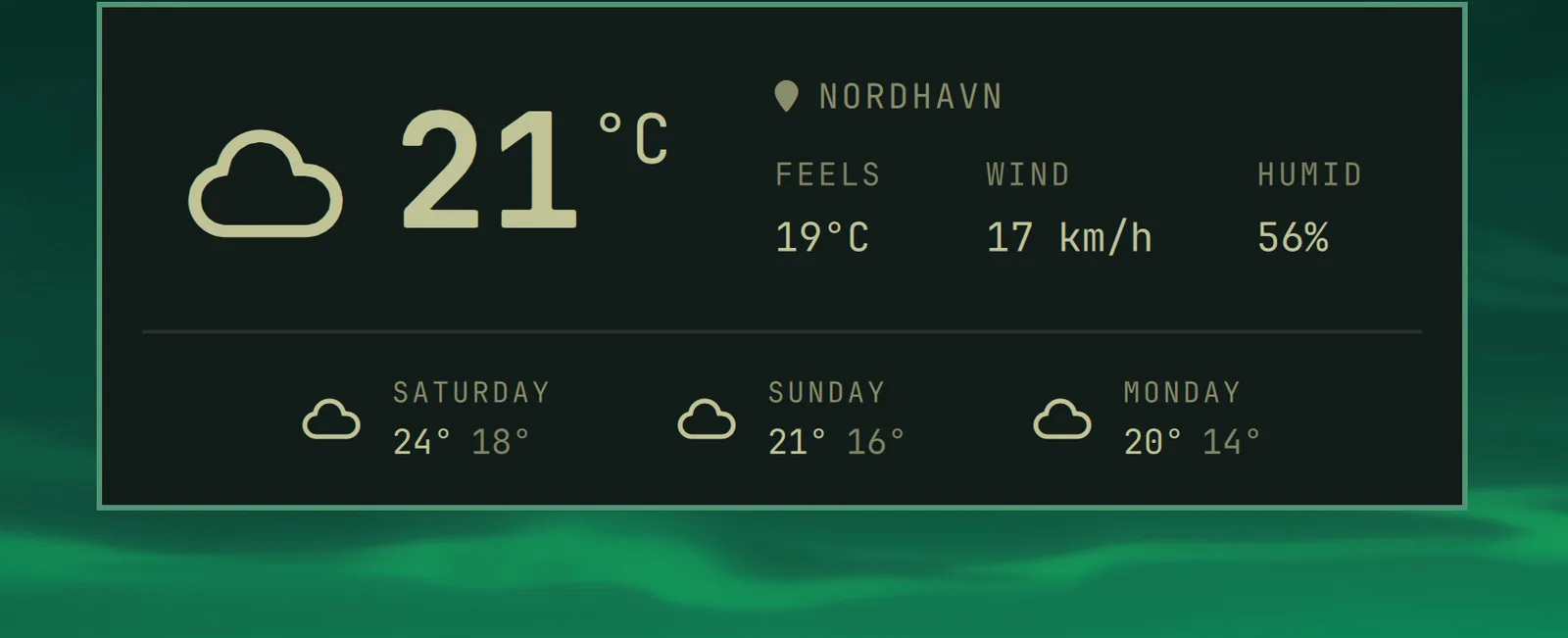
You can quickly access the date and time, battery status, and current weather using the hotkey notices.

Date & Time

Super + Ctrl + Alt + T

notice-datetime

Weather

Super + Ctrl + Alt + W

notice-weather

The location is detected from your IP address, which is usually close enough, but not always. You can pin it down with omarchy weather location --set Malibu, or be exact about it by adding coordinates: omarchy weather location --set Malibu 34.0259,-118.7798. Run omarchy weather location on its own to see where it thinks you are, and --clear to go back to auto-detection.

Battery

Super + Ctrl + Alt + B

notice-battery